Command line
Installing the package adds these commands:
| Command | What it does |
|---|---|
mcd_gui |
The desktop app. |
mcd_process |
Everything in one pass: convert, stitch, panoramas, metadata and post-processing. |
mcd_convert |
One OME-TIFF per region. |
mcd_stitch |
All regions on one canvas. |
tiff_subset |
Channel subsets and pyramids from existing OME-TIFFs. |
Each command lists its options with --help.
mcd_process
mcd_process INPUT_PATH [OUTPUT_PATH] [OPTIONS]
INPUT_PATH is a .mcd file, or a folder whose .mcd files are processed one after another. Each file's outputs go to OUTPUT_PATH/<file name>/, or to MCD_Processed/<file name>/ next to the input.
| Option | What it does |
|---|---|
--convert |
One OME-TIFF per region. |
--stitch |
All regions onto one canvas. |
-p, --panorama |
The slide panoramas as PNG images; large ones also get a copy with region outlines. |
-m, --metadata |
Print the regions, panoramas and indexed channels. Writes nothing. |
--roi_map IDX |
A region → panorama pixel map for these panorama indices, e.g. 0 or 1,3-5. Needs --convert or --stitch. |
-f, --filter "LIST" |
Also write copies holding only these channels, e.g. "0-5,7". |
--pyramid |
Also write a copy stored as tiles at several resolutions. |
-r, --roi "LIST" |
Only these regions, e.g. "0-5,7". A selection only — it never changes layer order. |
-d, --output_type |
uint16 (default) or float32. |
-c, --compression |
zstd (default), LZW or None. |
--max-memory SIZE |
The memory a run plans for, e.g. 8G. See Memory. |
-fand--pyramidpost-process what--convertand--stitchwrite, so they need one of them. Together they give one_filtered_pyramidcopy per file.-rworks on a single file. Region and channel indices are the ones-mprints; region 0 is the earliest acquired.
Look inside a file first
-m prints what a file holds — its panoramas, its regions with their acquisition times and sizes, and its channels — with the indices that -r and -f take. It writes nothing.
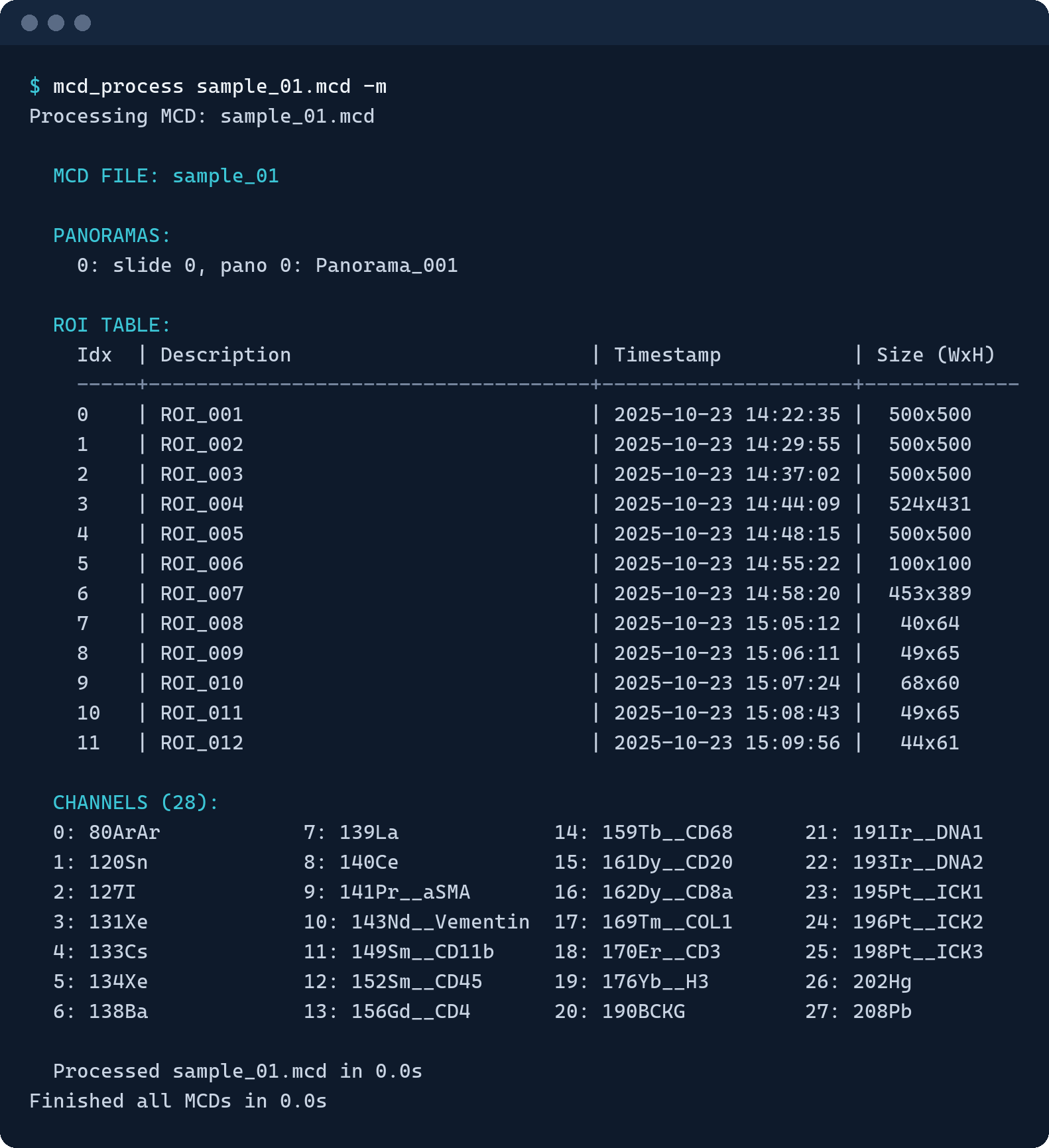
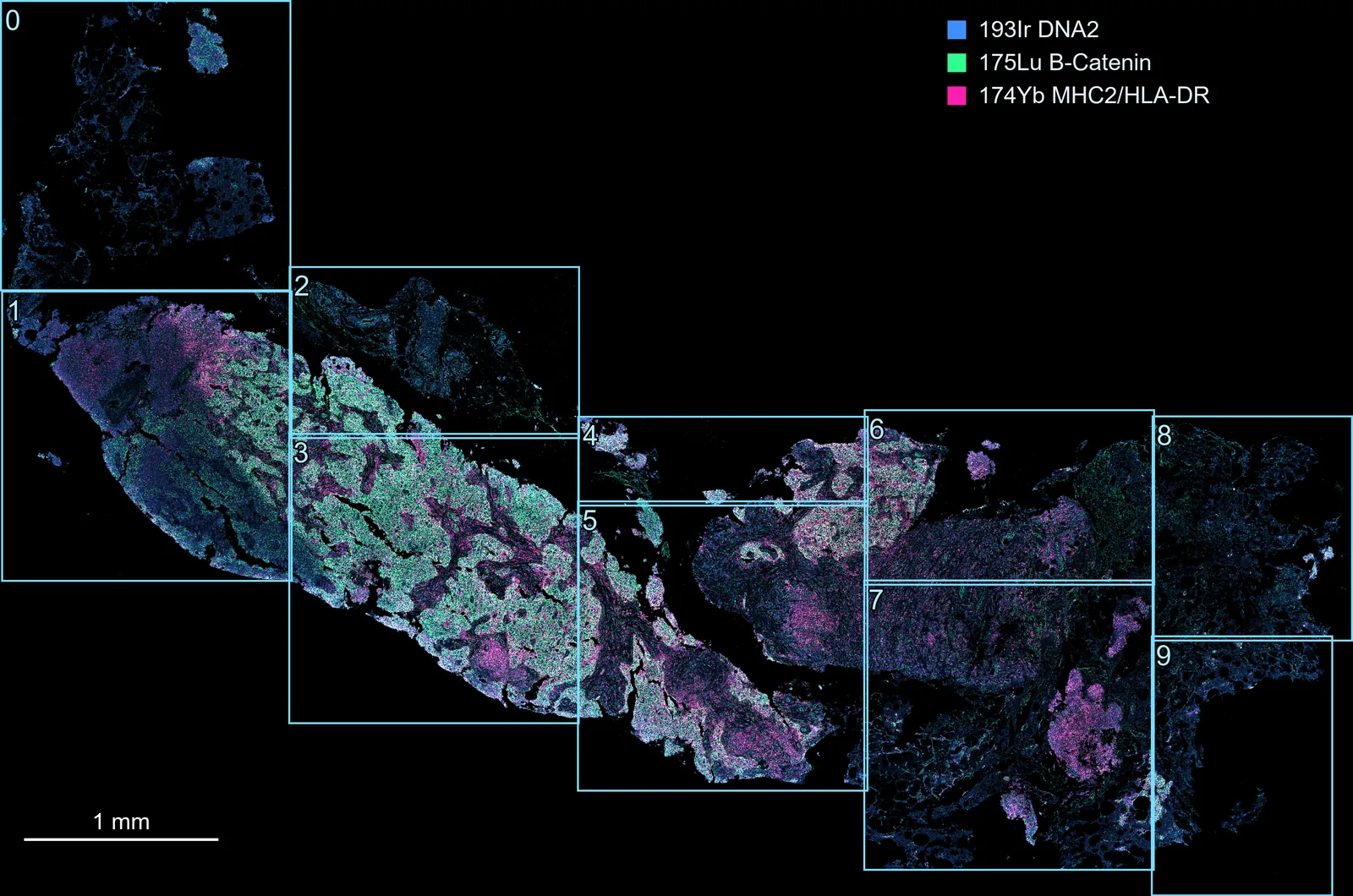
-r "0-3" would stitch regions 0 to 3 only.Examples
mcd_process "file.mcd" -m                            # inspect: regions, panoramas, channel indices
mcd_process "file.mcd" --convert                     # one OME-TIFF per region
mcd_process "file.mcd" --stitch --pyramid            # one zoomable stitched canvas
mcd_process "folder/" --convert --stitch             # every .mcd in a folder, both outputs
mcd_process "file.mcd" --stitch -r "0-3"             # stitch only regions 0–3
mcd_process "file.mcd" --convert -f "0-5,7"          # plus copies with only these channels
mcd_process "file.mcd" "D:/results" --stitch -c LZW  # choose the output folder and compression
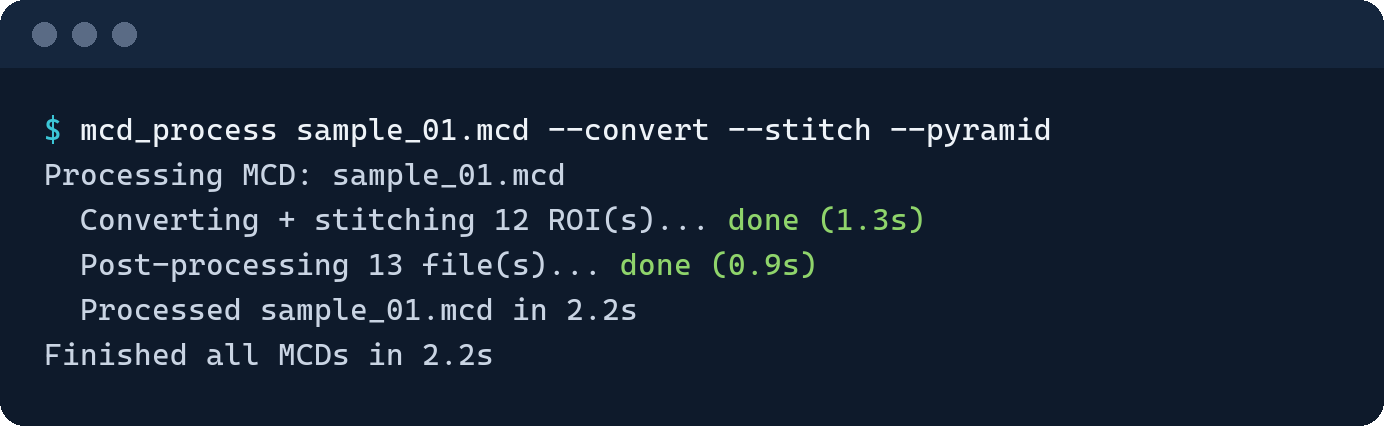
A run prints one line per step, with its time:
Output layout
MCD_Processed/<file name>/
├── <region>.ome.tiff                         --convert
├── <file name>_stitched.ome.tiff             --stitch
├── …_filtered.ome.tiff                       -f
├── …_pyramid.ome.tiff                        --pyramid   (…_filtered_pyramid with -f)
├── <file name>_slide_0_pano_0.png            -p          (+ _overlay.png on large panoramas)
└── <file name>_slide_0_pano_0_roi_map.txt    --roi_map
Region files are named after the region's description. Repeated descriptions get _2, _3 and so on, characters not allowed in file names become _, and a region with no description is named ROI_<id>.
mcd_convert and mcd_stitch
One step each, on a single .mcd file.
mcd_convert INPUT.mcd [OUTPUT_PATH] [OPTIONS]
mcd_stitch  INPUT.mcd [OUTPUT_PATH] [OPTIONS]
| Option | Command | What it does |
|---|---|---|
-d, --output_type |
both | uint16 (default) or float32. |
-c, --compression |
both | zstd (default), LZW or None. |
--max-memory SIZE |
both | See Memory. |
-j, --workers N |
mcd_convert |
How many regions to convert at once. Chosen from free memory and CPU count by default. |
-r, --roi "LIST" |
mcd_stitch |
Only these regions. |
mcd_convert writes to OUTPUT_PATH/<file name>/, or MCD_Converted/<file name>/ next to the input. mcd_stitch writes straight into OUTPUT_PATH, or MCD_Stitched/ next to the input.
tiff_subset
Channel subsets and pyramids for OME-TIFFs you already have.
tiff_subset INPUT_PATH [OUTPUT_PATH] [OPTIONS]
INPUT_PATH is a .tiff file, or a folder searched with its subfolders. Outputs go next to each input, or into OUTPUT_PATH with the same folder structure.
| Option | What it does |
|---|---|
-l, --list-channels |
List a file's channels with their indices. |
-f, --filter "LIST" |
Keep only these channels, as …_filtered.ome.tiff. |
-p, --pyramid |
Store the result as tiles at several resolutions, as …_pyramid.ome.tiff. |
-d, --output_type |
uint16 (default) or float32. |
-c, --compression |
zstd (default), LZW or None. |
--max-memory SIZE |
See Memory. |
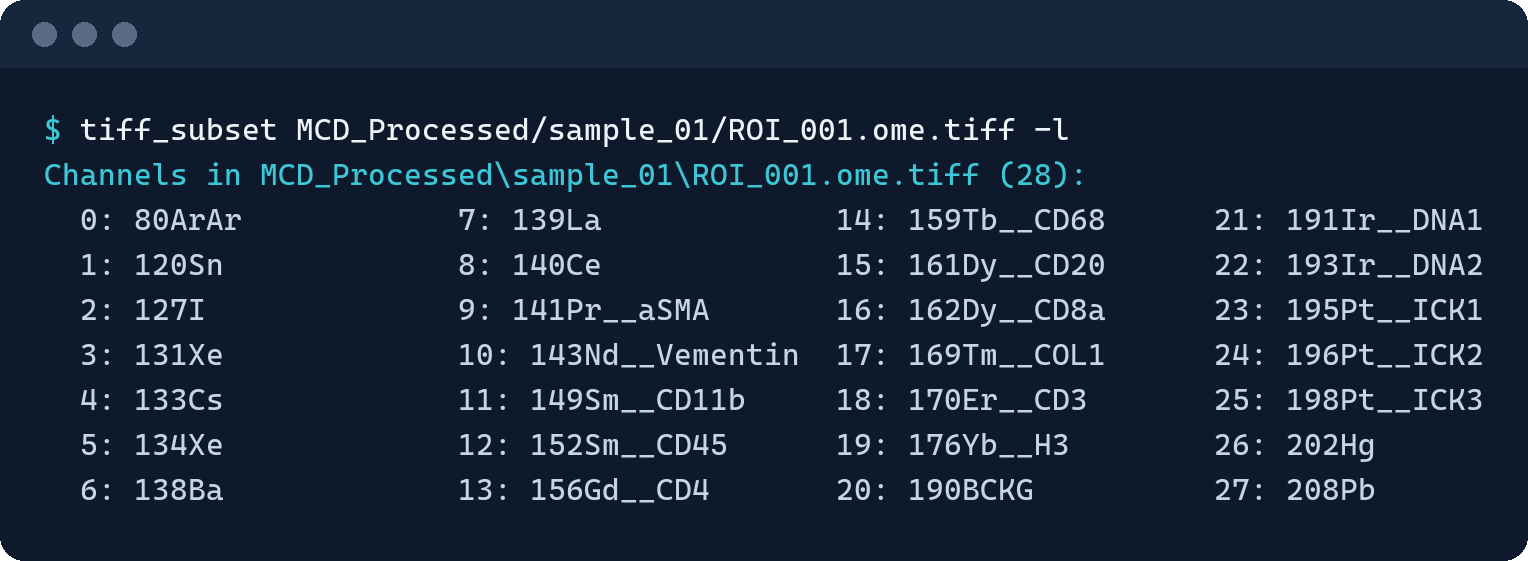
tiff_subset "ROI_001.ome.tiff" -l               # which channel has which index
tiff_subset "path/to/tiffs/" -f "0-5,7" -p      # a filtered pyramid copy of every .tiff below
Memory
Every run plans its work against a memory budget. Canvases too big for it are built in several passes, and very large regions are read in channel groups, instead of failing with an out-of-memory error. The budget comes from the first of these that is set:
--max-memory(or Memory cap in the app), e.g.8Gor512M- the
MCD_STITCHER_MAX_MEMenvironment variable - a container (cgroup) memory limit
- a Slurm job's memory allocation
- the free memory measured when the work is planned
On a shared workstation, setting a cap keeps runs reproducible whatever else is open.